Contents
Other connections
Open a serial console
To configure a router, a switch or a firewall through its console port, with a USB to serial cable.
By Lucas Russo, developer of SSHive · Updated
- Plug the USB to serial adapter in.
- Home, Serial console (or New Connection, Serial console).
- Device: choose the adapter (
/dev/cu.usbserial-...). Not there? Refresh. - Set Baud rate, Data bits, Parity, Stop bits and Flow control. Most equipment wants 9600, 8 data bits, no parity, 1 stop bit and no flow control, which is written "9600 8N1".
- Open.
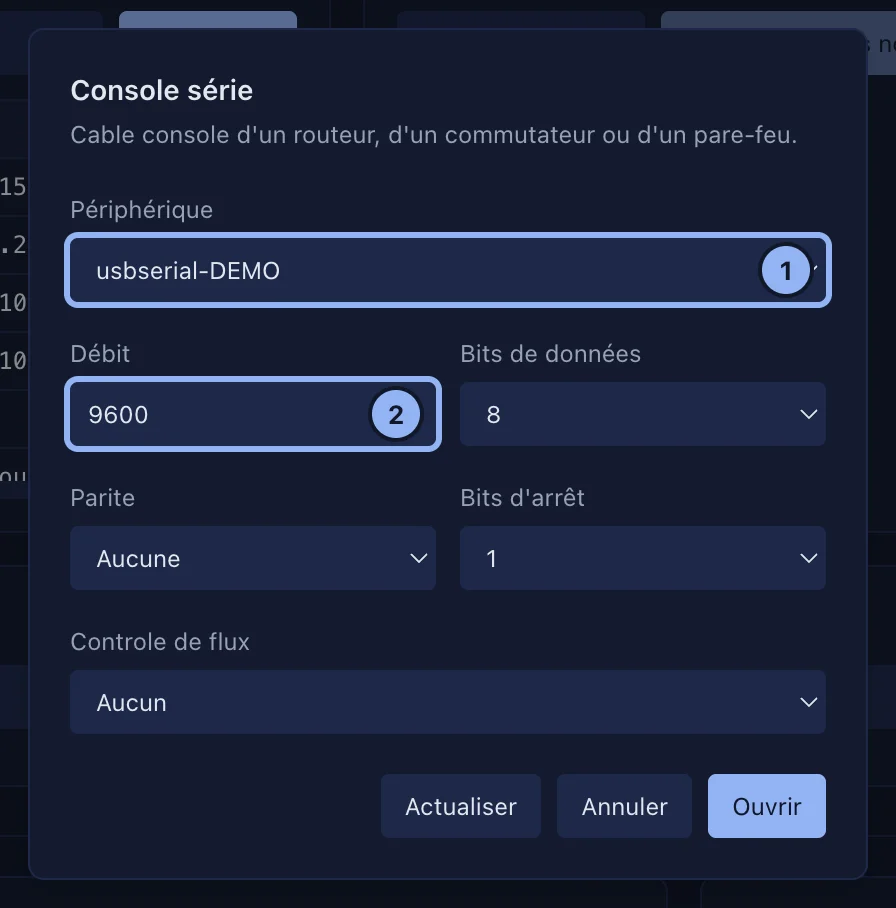
SSHive remembers the last settings on this Mac. The tab is the same terminal as an SSH session.
Sending a BREAK
The BREAK button of the toolbar (Send a BREAK signal) is what password recovery on a Cisco device, among others, asks for.
Applies to SSHive 2.0.6 on Mac